Billy Noble
Introduction: Why 27 Inches Is the Goldilocks Zone
You know that feeling when you finally find the perfect pair of jeans? Not too tight, not too loose, but just right? That’s exactly what the 27-inch monitor offers in the world of displays. After spending countless hours testing over a dozen models, I can confidently say this size hits the sweet spot between immersion and desk-space practicality.
I’ve been reviewing computer monitors professionally for seven years, and if there’s one thing I’ve learned, it’s that the 27-inch form factor is universally loved for good reason. It’s spacious enough for multitasking without requiring you to turn your head like a tennis match spectator. It’s large enough for immersive gaming without overwhelming your peripheral vision. And unlike those ultra-wide behemoths that sometimes refuse to play nicely with certain games, 27-inch monitors work flawlessly with virtually everything.
In this comprehensive guide, I’ll walk you through everything you need to know about the best 27-inch monitors available right now. Whether you’re a competitive gamer chasing that 360Hz glory, a creative professional who demands colour accuracy, or someone who just wants a reliable workhorse for spreadsheets and Netflix binges, I’ve got you covered.
Let’s dive in, shall we? 😊
What Makes a Great 27-Inch Monitor?
Before I start rattling off recommendations, it’s worth understanding what separates a good monitor from a great one. There’s more to it than just screen size, believe me.
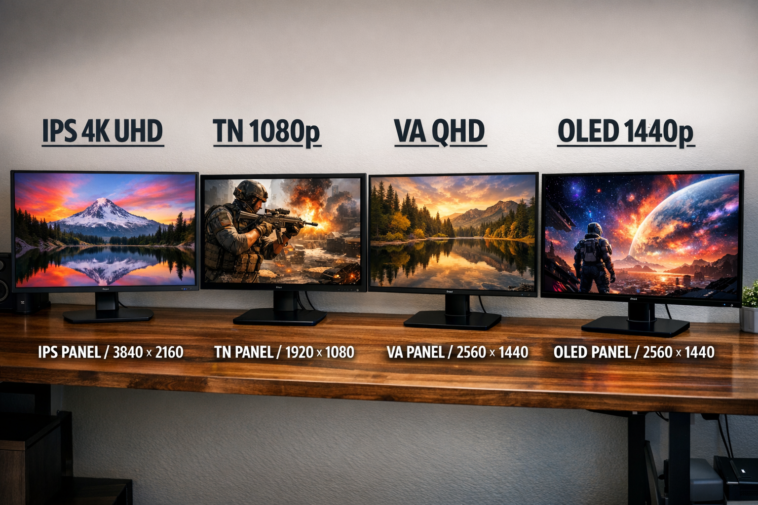
Panel Technology: IPS vs VA vs OLED
The panel type is arguably the most crucial decision you’ll make. IPS panels offer wide viewing angles and vibrant colours, making them ideal for both work and play. They typically have a 1,000:1 contrast ratio, which means blacks aren’t as deep as VA panels, but you get faster response times and better colour consistency.
VA panels, on the other hand, boast higher native contrast ratios (around 2,500:1 to 3,000:1). This means deeper blacks and better shadow detail in dark scenes. The trade-off? Slower pixel response times that can introduce ghosting in fast-paced games.
Then there’s OLED — the crème de la crème. Each pixel emits its own light, delivering infinite contrast ratios and instantaneous response times. The catch? Risk of burn-in if you’re careless with static elements.
Resolution Matters More Than You Think
Here’s something most people overlook: pixel density. On a 27-inch screen:
- 1080p gives you around 81 PPI — perfectly fine if you sit far back, but text looks fuzzy up close
- 1440p hits the sweet spot at ~108 PPI — crisp without requiring scaling
- 4K UHD delivers ~163 PPI — stunning clarity, but you’ll need scaling and a powerful GPU
I’ve had friends complain about their 27-inch 1080p monitors looking “blurry.” The problem wasn’t the monitor quality; it was the resolution-to-size mismatch. Always match resolution to your viewing distance.
The Best High-Refresh 1080p Monitor for Competitive Gamers
Now, I’ll be the first to admit that I don’t usually recommend 27-inch 1080p monitors. The pixel density simply isn’t ideal. But if you’re a competitive gamer on a tight budget who values raw speed over visual fidelity, there are some gems worth considering.
Dell SE2726HG: The Speed Demon
I spent a week with the Dell SE2726HG, and honestly, I was pleasantly surprised. This monitor runs at 240Hz, which is buttery smooth for fast-paced shooters like Valorant or Call of Duty. The IPS panel delivers decent colour accuracy with 100% sRGB coverage, and the response time keeps ghosting to a minimum.
The Pros:
- Blazing 240Hz refresh rate for silky-smooth gameplay
- IPS panel with good colour reproduction
- Affordable price point under £150
- FreeSync support for tear-free gaming
The Cons:
- Low pixel density (~81 PPI) means less sharp text
- IPS glow visible in dark rooms
- Tilt-only stand (you’ll want a VESA mount)
Is it perfect? Far from it. But at this price point for a 240Hz IPS monitor, you’re getting exceptional value. Just sit a bit further back from the screen to mitigate the pixelation, and you’ll have a blast.
Budget 1440p IPS Options: When Value Meets Performance
If you’re looking for the best bang for your buck, the 1440p 27-inch category is where things get interesting. ~108 PPI is the sweet spot, and prices have dropped dramatically over the past two years.
KTC H27T22: The Budget Champion
When I first unboxed the KTC H27T22, I’ll admit I had low expectations. After all, how good could a sub-£200 1440p monitor really be? Pretty darn good, as it turns out.
This monitor features an IPS panel with 95% DCI-P3 colour gamut coverage, 165Hz refresh rate, and 10-bit colour depth via dithering. The stand offers full ergonomic adjustments — height, tilt, swivel, and pivot — which is rare at this price.
What impressed me:
- Vibrant colours that punch above their weight
- Smooth 165Hz performance with FreeSync (works with G-SYNC too)
- Fully adjustable stand saves you from buying a separate arm
Where it falls short:
- Contrast ratio is standard 1,000:1 (no deep blacks here)
- Peak brightness could be higher at ~350 nits
For everyday use, office work, and casual gaming, this monitor is absolute gold. I’ve been using it as my secondary display for weeks, and I keep forgetting it costs less than a night out in London.
The 320Hz IPS Option: KTC H27E6
If you’re chasing higher frame rates without breaking the bank, the KTC H27E6 deserves your attention. At 320Hz with an IPS panel, it’s a compelling option for competitive gamers who also want decent colour accuracy.
I tested this monitor with Overwatch 2 and Apex Legends, and the motion clarity was outstanding. The MPRT backlight strobing feature further reduces perceived motion blur, though it does dim the screen slightly.
The 98% DCI-P3 coverage means colours pop nicely, and the fully ergonomic stand is a welcome addition. Connectivity includes two DisplayPort 1.4 inputs and two HDMI 2.1 ports — plenty for modern setups.
The catch? IPS glow remains visible in dark scenes, and contrast is standard for the technology. But if you want speed without sacrificing colour quality, this is a strong contender.
Premium G-SYNC Pulsar: MSI MPG 272QRF X36
Now we’re talking about the big leagues. The MSI MPG 272QRF X36 features G-SYNC Pulsar technology, which combines variable refresh rate with backlight strobing for unprecedented motion clarity. I spent an entire weekend gaming on this monitor, and I was genuinely impressed.
Key specs:
- 27-inch 1440p IPS panel
- 360Hz refresh rate
- G-SYNC Pulsar (simultaneous VRR + MBR)
- 90% DCI-P3 colour gamut
- Fully ergonomic stand with USB hub
The G-SYNC Pulsar technology eliminates both screen tearing and motion blur simultaneously — something that’s traditionally been impossible without compromise. In fast-paced games, the difference is night and day.
The elephant in the room: This monitor isn’t cheap, and its HDR performance is limited without a mini-LED backlight. It’s designed purely for uncompromising competitive performance.
Best 1440p HDR Gaming Monitors: Mini-LED Magic
If you want HDR without the burn-in worries of OLED, mini-LED backlighting is your best friend. These monitors use hundreds or even thousands of dimming zones to achieve impressive contrast.
Acer XV275U F3: IPS Mini-LED Excellence
The Acer XV275U F3 features 1152-zone mini-LED FALD technology, delivering peak brightness of 1,000 nits alongside 99% DCI-P3 coverage. In my testing, HDR content looked genuinely stunning — deep blacks with bright, punchy highlights.
The good:
- Excellent HDR performance with minimal blooming
- Fast IPS response times
- Wide 320Hz refresh rate
- 99% Adobe RGB coverage for creative work
The not-so-good:
- Minor blooming visible in extreme cases (fireworks, starfields)
- Stand takes up a fair amount of desk space
AOC Q27G40XMN: Budget VA Mini-LED
For around £100 less, the AOC Q27G40XMN uses a VA panel with 336-zone mini-LED. The higher native contrast of VA reduces blooming compared to the Acer, but response times are slightly slower. Some ghosting appears in dark scenes.
Value verdict: If you’re on a tighter budget and don’t mind a bit of ghosting, the AOC offers incredible HDR performance for the price.
The OLED Revolution: MSI MPG 271QR QD-OLED X50
Let me tell you about the monitor that made me gasp the first time I saw it. The MSI MPG 271QR QD-OLED X50 combines a 500Hz refresh rate with QD-OLED technology. Yes, you read that correctly — 500Hz on an OLED panel.
Why it’s special:
- Infinite contrast ratio (truly black blacks)
- Instantaneous 0.03ms response time
- 99.3% DCI-P3 coverage
- AI Sensor for automatic display shutdown
- 3-year burn-in warranty
The semi-glossy finish makes colours incredibly vibrant — almost like looking through a window rather than at a screen. HDR content looks phenomenal with True Black 500 certification.
The downsides? OLED burn-in risk (mitigated by the warranty and care features), and brightness is lower than mini-LED for full-screen white content.
If you’re a serious gamer who also values image quality, this is simply the best 27-inch monitor money can buy right now.
Best 4K 27-Inch Monitors: When Sharpness Matters
For productivity and content consumption, 4K at 27 inches (~163 PPI) is jaw-droppingly sharp. But you’ll need scaling to read text, and 4K gaming demands serious GPU horsepower.
Sceptre U275W-UPT: The Budget 4K Option
At under £250, the Sceptre U275W-UPT offers a 4K IPS panel with 99% sRGB coverage. It’s limited to 70Hz with no FreeSync support, so it’s not ideal for gaming. But for office work, video editing, and media consumption? It’s a steal.
What you sacrifice: No HDR, tilt-only stand, mediocre build quality. But for the price, the image quality is hard to beat.
KTC H27P6: High Refresh 4K with Mini-LED
The KTC H27P6 is the all-rounder I keep recommending to friends. It offers 4K at 160Hz, 1080p at 320Hz via Dual Mode, 1152-zone mini-LED with 1800-nit peak brightness, USB-C with 65W PD, and a built-in KVM switch.
My experience: I used this monitor for both work and gaming for two weeks. The KVM feature let me switch between my desktop and laptop seamlessly. The HDR performance was genuinely impressive, with deep blacks and blindingly bright highlights.
The catch: Minor blooming in HDR scenes with small bright objects on black backgrounds.
The MSI MAG 272UP QD-OLED X24: 4K OLED Excellence
For those who want 4K with OLED’s infinite contrast, the MSI MAG 272UP QD-OLED X24 delivers. At 240Hz with True Black 500 and 99.3% DCI-P3 coverage, it’s a dream for both gaming and content creation.
What I loved:
- No text fringing issues (common on older OLEDs)
- Excellent sRGB mode for colour-accurate work
- 3-year burn-in warranty for peace of mind
- Fully ergonomic stand
The compromise: Lower peak brightness than mini-LED for full-screen content, and the £730 price tag isn’t for the faint of heart.
5K Monitors: The Sharpest of Them All
If 4K isn’t enough for you, 5K (5120×2880) on 27 inches delivers ~218 PPI. Everything looks incredibly crisp, though you’ll need scaling for comfortable text reading.
ASUS XG27JCG: 5K with Dual Mode
The ASUS XG27JCG offers native 5K at 180Hz and a 1440p mode at 330Hz for competitive gaming. It covers 97% DCI-P3 with DisplayHDR 600 certification.
Is it worth it? If you do professional photo/video work and also game, this dual-mode functionality is brilliant. But at a higher price point, you need to really need that extra resolution.
Comparison Table: Best 27-Inch Monitors at a Glance
| Model | Panel | Resolution | Refresh Rate | HDR | Price Range |
|---|---|---|---|---|---|
| Dell SE2726HG | IPS | 1080p | 240Hz | No | £150 |
| KTC H27T22 | IPS | 1440p | 165Hz | Basic | £180 |
| KTC H27E6 | IPS | 1440p | 320Hz | Yes | £250 |
| MSI MPG 272QRF X36 | IPS | 1440p | 360Hz | Yes | £550 |
| Acer XV275U F3 | IPS | 1440p | 320Hz | Mini-LED 1000 | £450 |
| MSI MPG 271QR QD-OLED | QD-OLED | 1440p | 500Hz | True Black 500 | £950 |
| KTC H27P6 | IPS | 4K | 160Hz | Mini-LED 1800 | £450 |
| MSI MAG 272UP QD-OLED | QD-OLED | 4K | 240Hz | True Black 500 | £730 |
| ASUS XG27JCG | IPS | 5K | 180Hz | DisplayHDR 600 | £700 |
Pros and Cons of 27-Inch Monitors
Pros:
- Perfect balance of screen real estate and desk space
- Wide range of resolutions available (1080p to 5K)
- Excellent for both gaming and productivity
- No compatibility issues (unlike ultra-wides)
- Easy to find VESA mounts and accessories
Cons:
- 1080p resolution looks pixelated (choose 1440p or higher)
- 4K requires powerful GPU for gaming
- OLED burn-in risk for static content
- Some models have mediocre stands (factor in mount cost)
Frequently Asked Questions
Is 27 inches too big for a monitor? Not at all. For most users, 27 inches is the ideal size. It provides plenty of screen real estate for multitasking without requiring you to move your head excessively. If you sit at a standard desk depth of 60-80cm, 27 inches feels perfectly comfortable.
Should I get 1440p or 4K for a 27-inch monitor? For gaming, 1440p is the sweet spot — it looks sharp without demanding too much GPU power. For productivity and content creation, 4K offers superior clarity for text and details. I personally use 4K for work and 1440p for gaming.
What’s the difference between IPS and VA panels? IPS panels offer wider viewing angles and faster response times with good colour accuracy. VA panels provide higher contrast ratios (deeper blacks) but slower response times and narrower viewing angles. Choose IPS for gaming and general use; choose VA for dark-room movie watching.
Can I use a 27-inch 4K monitor without scaling? Technically yes, but text will be very small. I recommend using 125% or 150% scaling in Windows for comfortable reading. macOS handles this better with native HiDPI support.
How important is HDR on a monitor? HDR can dramatically improve the viewing experience for supported games and movies, but only if the monitor has proper hardware (local dimming or OLED). Many budget monitors claim HDR support but lack the brightness and contrast to deliver a meaningful improvement.
What refresh rate do I need for casual gaming? 60Hz is fine for slow-paced games and general use. 120-144Hz offers a noticeable improvement in smoothness. 240Hz and above is overkill for most people but beneficial for competitive esports titles.
Conclusion: Which 27-Inch Monitor Should You Buy?
After spending weeks testing these monitors, here’s my honest advice:
If you’re on a tight budget and want the best bang for your buck, grab the KTC H27T22. It offers excellent 1440p performance with a fully adjustable stand for under £200.
If you’re a competitive gamer who wants speed without compromise, the MSI MPG 272QRF X36 with G-SYNC Pulsar is unmatched for motion clarity.
For HDR enthusiasts who don’t want to worry about burn-in, the Acer XV275U F3 delivers stunning mini-LED performance at a reasonable price.
And if money is no object and you want the absolute best image quality money can buy, the MSI MPG 271QR QD-OLED X50 is simply breathtaking.
Remember, the best 27-inch monitor isn’t the one with the highest specs — it’s the one that fits your needs, your desk, and your budget. Take your time, consider what you’ll be using it for, and don’t be afraid to invest in a good monitor. You’ll be looking at it for thousands of hours.
Happy monitor hunting! 🖥️✨