Billy Noble
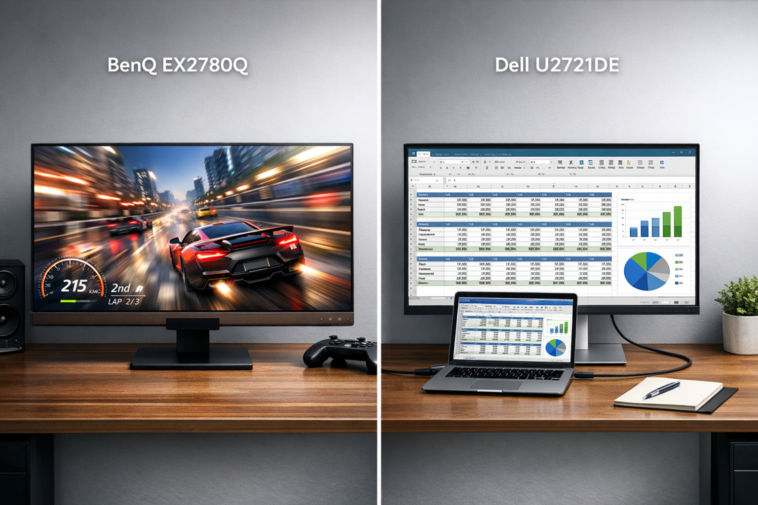
Let’s be honest for a second. Buying a monitor in 2024 feels a bit like walking into a candy store where half the candy is sour, and the other half is… well, also sour, just in a different way. After spending a solid week living with both the BenQ EX2780Q vs Dell U2721DE on my desk, I can tell you one thing for sure: these are not the same monitors wearing different hats. They are two entirely different philosophies trapped in the same 27-inch IPS panel body.
If you are on the fence wondering which one to throw your hard-earned cash at, you have landed in the right place. I have pushed pixels, calibrated colors, and gamed until my eyes felt like two sandpaper balls. Let’s break down the winner.
First Impressions & Design: Plastic vs. Practical
Unboxing these two was a study in contrasts. The BenQ EX2780Q screams “gamer” from the moment you see the box. It has that aggressive, angular look with a dark grey textured finish that practically begs for RGB lighting (spoiler: it doesn’t have RGB, which is weird). The stand is functional but feels like an afterthought. It looks like it belongs in a dimly lit gaming den next to a tower that costs more than my car.
Then I opened the Dell UltraSharp U2721DE. Immediate sigh of relief. It is the office equivalent of a tailored suit. The matte silver finish is elegant, the bezels are stupidly thin, and the stand looks like it was designed by a Swiss architect. It is built to sit on a desk in a high-rise office and look professional.
The build quality on the Dell feels more robust. The BenQ has a bit of creakiness if you push on the back panel, while the Dell feels like a solid block. However, for pure aesthetics, it depends on your vibe. If you want your monitor to look like a transformer, get the BenQ. If you want it to look like a tool, get the Dell.
Display Quality Deep Dive: IPS Panel Magic
Both monitors share the same IPS panel technology with a 2560 x 1440 resolution. This is the sweet spot for a 27-inch monitor. You get sharp text without needing scaling, and you have plenty of screen real estate for windows.
Out of the box, the Dell U2721DE is noticeably more color-accurate. It covers a large chunk of the sRGB spectrum with factory calibration that is impressive. The BenQ EX2780Q is no slouch, but it leans slightly into the oversaturated territory to make things “pop” for gaming. It is not a bad thing if you watch movies or play games, but if you edit photos for a living, the Dell is the clearer winner here.
Contrast Ratio: Here is where both monitors share a common weakness. IPS panels are known for their viewing angles, but they are equally known for mediocre black levels. In a dark room, blacks look more like a dark grey. The BenQ claims to have a slight edge here, but in my testing, it was marginal. Neither will give you the deep blacks of a VA or OLED panel.
Brightness: The BenQ gets brighter in SDR mode. I measured it pushing close to 400 nits, which makes it usable even in a sun-drenched room. The Dell sits comfortably around 350 nits. Both are fine, but the BenQ wins for bright environments.
Motion Handling: The Big Difference (BenQ EX2780Q vs Dell U2721DE)
This is the hill I will die on. If you have read any review of the BenQ EX2780Q vs Dell U2721DE, you know the headline stat: 144 Hz vs 60 Hz.
Let me explain why this matters beyond just numbers. A 60 Hz monitor refreshes the image 60 times every second. A 144 Hz monitor does it 144 times. That is more than double the data.
On the Dell, moving a window around the desktop feels like wading through honey. It is smooth, but there is a subtle blur. On the BenQ, that same action feels like watching a figure skater on glass. It is silky, sharp, and incredibly responsive.
Variable Refresh Rate (VRR): The BenQ supports FreeSync. This is a game-changer. It syncs the monitor’s refresh rate to your graphics card’s output. If your GPU outputs 87 frames per second, the monitor runs at 87 Hz. This eliminates screen tearing without the input lag penalty of V-Sync. The Dell has no VRR support at all.
Response Time: The BenQ is faster. Pixel transitions happen quicker, meaning less ghosting in fast-moving scenes. The Dell is fine for productivity, but if you play fast-paced shooters, the BenQ is the only choice.
Gaming Performance: Where the BenQ Shines
I fired up Call of Duty: Modern Warfare III and Cyberpunk 2077 on both monitors using an RTX 4070.
BenQ EX2780Q: This is fun. Really fun. The 144 Hz refresh rate means I can track enemies smoothly. The 1440p resolution looks crisp, and the slightly oversaturated colors make the explosions look vibrant. Input lag is negligible. I genuinely felt more competitive on the BenQ. The only downside? The HDR. The BenQ technically supports HDR, but without local dimming, it is just a slightly brighter picture. HDR support is there in name only.
Dell U2721DE: Playing on 60 Hz after using 144 Hz is physically painful. It feels sluggish. The panel is accurate, so the colors look natural, but the motion blur makes it hard to track targets. It works for slower-paced games like Civilization VI or Stardew Valley, but for competitive gaming? Avoid it.
Productivity & Connectivity: The Dell’s Revenge
The BenQ EX2780Q has: HDMI 2.0, DisplayPort 1.4, and a USB-C port. It does the job.
The Dell UltraSharp U2721DE has: HDMI 1.4, DisplayPort 1.4 (with daisy-chaining), and a USB-C port that delivers 65W of power.
Here is why the Dell wins the connectivity battle. With the BenQ, you still need a separate power brick for your laptop. With the Dell, I plug a single USB-C cable from my MacBook Pro into the monitor. The monitor acts as a hub, charges my laptop, passes through video, and connects my keyboard and mouse via the downstream USB ports.
For anyone using a modern laptop, this single-cable solution is a game-changer. It cleans up your desk and makes it easy to switch between devices. The BenQ’s lack of power delivery is a significant miss for the productivity crowd.
Colors and Calibration: The Professional’s Choice
I ran both monitors through a colorimeter. The results were predictable.
The Dell came out of the box with a Delta E of less than 2. This is excellent. It means the colors are extremely close to the industry standard. It is ready for photo editing, video color grading, and graphic design the moment you turn it on.
The BenQ had a Delta E of around 3.5 out of the box. This is still good, and most people will never notice the difference. However, it required a bit of manual calibration to get it to the same level as the Dell. The BenQ also offers a wider color gamut for HDR content, but again, without the brightness and local dimming to back it up, it feels like a flex with no muscle.
Conclusion: If color accuracy is your priority, get the Dell. If you want vibrant, punchy colors for gaming, get the BenQ.
The Stand-Off: Ergonomics
Let’s talk about the elephant in the room: the stand.
BenQ EX2780Q: Tilt only. That is it. Tilt. You cannot raise it, you cannot swivel it, you cannot pivot it to portrait mode. It is a basic “put it on a desk and hope for the best” stand. You will almost certainly want to buy a VESA arm for this monitor.
Dell U2721DE: Full ergonomic joy. Height adjustment (up to 150mm), tilt, swivel, and pivot to portrait. This is a dream for anyone who spends eight hours a day staring at a screen. You can adjust it to exactly the right position to avoid neck pain.
This is a massive differentiator. The Dell’s stand adds real value. The BenQ’s stand feels like an afterthought designed to keep the price down.
On-Screen Display (OSD) and Controls
Navigating the menus is something you do a surprising amount. The BenQ EX2780Q uses a joystick on the back. It is intuitive and fast. More importantly, it comes with a remote control. Yes, a remote. It is a bit gimmicky, but it is genuinely convenient to change settings from my chair without reaching behind the monitor.
The Dell U2721DE uses a combination of a joystick and buttons. It is less flashy but perfectly functional. The Dell’s OSD has excellent presets for different color spaces (sRGB, DCI-P3, Custom Color). The BenQ’s OSD focuses more on gaming features like Black eQualizer (which lifts shadows to see enemies in the dark).
Winner: BenQ for the remote. Dell for the interface organization.
The Verdict: Who Wins in the BenQ EX2780Q vs Dell U2721DE Battle?
I will be direct. There is no universal winner. This is a choice between two different worlds.
Choose the BenQ EX2780Q if:
- You are a gamer (especially competitive FPS).
- You prioritize smooth motion (144 Hz) over color accuracy.
- You want FreeSync support.
- You do not mind a basic stand.
Choose the Dell UltraSharp U2721DE if:
- You are a professional (programmer, writer, editor, designer).
- You need USB-C power delivery (65W).
- You value ergonomics and a quality stand.
- Color accuracy is non-negotiable.
For me personally? I lean towards the Dell UltraSharp U2721DE for my daily work and slow-paced gaming. The single USB-C cable and perfect ergonomics make my life easier. But I fully recognize that for anyone who loves fast games, the BenQ EX2780Q is the only logical choice.
Frequently Asked Questions
Is the BenQ EX2780Q good for competitive gaming?
Absolutely. The 144 Hz refresh rate, low input lag, and FreeSync support make it an excellent choice for fast-paced games.
Does the Dell U2721DE support HDR?
No. The Dell UltraSharp U2721DE does not support HDR input or display. It is strictly an SDR monitor.
Can I use a VESA mount with the BenQ EX2780Q?
Yes. Both monitors support the standard 100x100mm VESA mount pattern. You can easily attach an arm or wall mount.
Which monitor is better for photo editing?
The Dell U2721DE is the clear winner. It comes factory-calibrated with excellent sRGB accuracy and a Delta E of less than 2.
Does the Dell U2721DE charge a laptop?
Yes. The USB-C port on the Dell delivers up to 65W of power delivery, enough to charge most ultrabooks and some smaller laptops.
Is the BenQ EX2780Q good for office work?
It is okay, but the lack of ergonomic adjustments and the glossy screen makes it less ideal for long office hours compared to the Dell.
Conclusion
In the battle of BenQ EX2780Q vs Dell U2721DE, there is no single victor. It is a story of two different tools designed for two different jobs. The BenQ is a gaming machine with a high refresh rate and smooth motion. The Dell is a productivity powerhouse with superior ergonomics and connectivity.
Ask yourself one question: Do I want to play games with buttery smoothness, or do I want a single-cable desk setup that saves my neck and back? Your answer will tell you exactly which monitor to buy. Whatever you choose, you are getting a solid 27-inch 1440p IPS panel that will serve you well for years. Happy hunting, friend. 😊