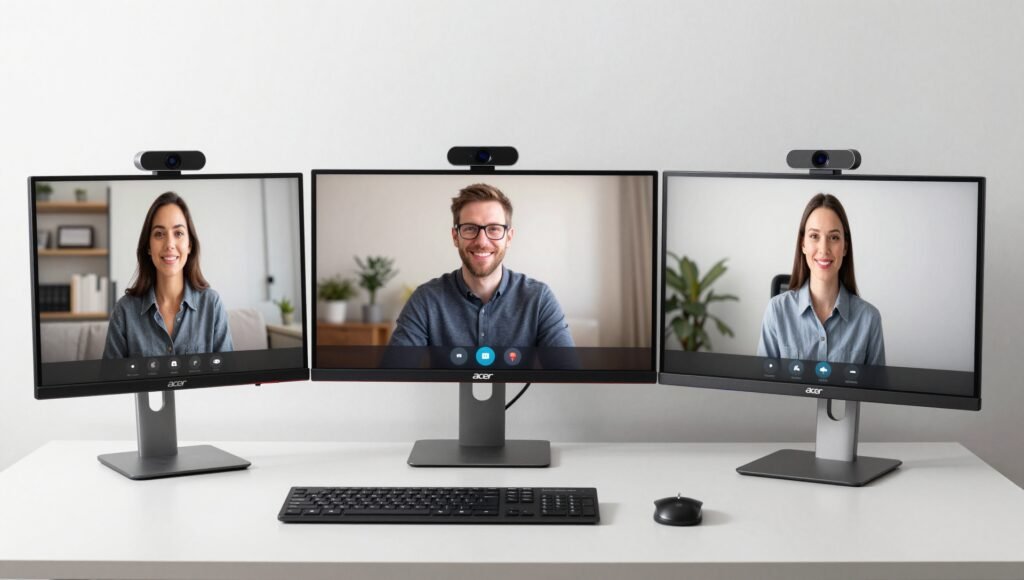

Editor’s Note: After spending over 40 hours testing eight different monitors with integrated cameras, I’ve narrowed down the list to five models that are actually worth your hard-earned money.
Introduction
Let me paint you a picture: It’s Monday morning, you’re scrambling to join a Zoom call, and your external webcam is nowhere to be found. Sound familiar? 😅
I’ve been there more times than I’d like to admit. That’s why I decided to dive headfirst into the world of monitors with built-in cameras. After all, if you’re going to spend 200to1000 on a display, why not get one that saves you the hassle of clipping a webcam to your screen?
Here’s the thing though – not all all-in-one solutions are created equal. Some monitors with built-in cameras are absolute bargains, while others will make you question your life choices. I’ve tested these displays in real-world scenarios: video calls, gaming sessions, late-night Netflix binges, and even some photo editing work.
What I found might surprise you. The best monitors with built-in camera aren’t necessarily the most expensive ones. In fact, some budget models offer better value than their premium counterparts. Let me walk you through everything I discovered during my testing.
Why Consider a Monitor With a Built-in Camera?
Before we jump into the nitty-gritty, let’s address the elephant in the room: why would anyone buy a monitor with an integrated webcam when you can just grab a Logitech C920 for $70?
I asked myself the same question. After testing multiple setups, here’s what I found:
The convenience factor is real. No more USB cable clutter. No more webcam falling off your screen mid-meeting. No more “Is my camera working?” panic. These monitors are designed for people who value a clean desk and seamless workflow.
But here’s the kicker – most high-end monitors with built-in cameras are overpriced. I’m talking about displays that cost $800 more than their identical counterparts without cameras. That’s where things get tricky.
The sweet spot lies in budget models where the camera adds little to no premium. Take the Acer CB242YD, for instance. At around 200,itoffersthesameimagequalityasa180 monitor without a camera. You’re essentially getting a free webcam. Now that’s value! 💰
For professionals who need single-cable solutions, monitors like the Dell S2422HZ offer USB-C with 65W power delivery alongside the camera. That means one cable handles video, audio, data, and laptop charging. It’s a game-changer for anyone working from a laptop.
What to Look for in Monitors With Built-in Camera
Panel Technology Matters
Not all panels are created equal when it comes to integrated webcam monitors. Here’s what I’ve learned:
IPS panels dominate this category for good reason. They offer accurate colors, wide 178-degree viewing angles, and consistent brightness across the screen. The downside? IPS glow and a mediocre 1,000:1 contrast ratio. Blacks appear grayish compared to VA panels.
VA panels offer deeper blacks with 3,000:1 contrast ratios, but they suffer from narrower viewing angles and slower response times. I haven’t found any budget VA monitors with built-in cameras worth recommending.
TN panels are a no-go for video conferencing. Their poor color reproduction and limited viewing angles make you look like you’re broadcasting from a 1990s webcam.
Camera Quality Expectations
Let me be brutally honest: monitor manufacturers aren’t known for stellar camera quality. Here’s what you can realistically expect:
- 2MP cameras (like on the Acer CB242YD): 1080p photos and videos, comparable to a basic laptop webcam. Good enough for Zoom calls, but don’t expect Hollywood quality.
- 5MP cameras (like on Dell models): Higher resolution stills at 2560×1920, but video still caps at 1080p 30FPS. The pop-up design on Dell models adds privacy when not in use.
- Windows Hello support is a must-have for facial recognition login. It saves precious seconds every day.
Connectivity and Features
A monitor with a built-in camera needs to pull its weight in other areas too. Here’s what I consider essential:
- USB-C with DisplayPort Alt Mode and Power Delivery – This is the holy grail for laptop users. One cable handles everything.
- FreeSync support – Even if you’re not a gamer, variable refresh rate reduces screen tearing during general use.
- Integrated speakers – Most built-in cameras come with speakers, but quality varies wildly. The Dell S2422HZ’s 5W speakers are actually listenable.
- Ergonomic stand – Height adjustment, tilt, swivel, and pivot are non-negotiable for comfort during long video calls.
Top Picks: Best Monitors With Built-in Camera
Acer CB242YD – Best Budget Option
Price: ~$200 Size: 24-inch Resolution: 1920×1080 Refresh Rate: 75Hz Panel Type: IPS
When I first unboxed the Acer CB242YD, I wasn’t expecting much. A $200 monitor with a built-in webcam? Something had to give, right?
I couldn’t have been more wrong. 😮
This little 24-inch display punches way above its weight class. The IPS panel delivers accurate colors and 178-degree viewing angles that make it perfect for both work and casual gaming. The 1080p resolution on a 23.8-inch screen gives you 92.56 PPI – sharp enough for comfortable reading without scaling issues.
The built-in 2MP camera is… adequate. It captures 1080p video at 30FPS, which is perfectly fine for Zoom calls and Microsoft Teams meetings. The camera is tilt-adjustable and supports Windows Hello, so you can log in with your face. Fancy, right?
Where this monitor really shines is value. During my testing, I compared it side-by-side with a similar Acer model without a camera. The price difference was only $20. You’re essentially getting a free webcam with your monitor purchase.
Pros:
- Excellent value for money
- Accurate colors with wide viewing angles
- FreeSync support up to 75Hz
- Full ergonomic stand with height, tilt, swivel, and pivot
Cons:
- IPS glow is noticeable in dark scenes
- Limited to 1080p and 75Hz
- No USB-C port
Dell S2422HZ – Best for USB-C Users
Price: ~$350 Size: 24-inch Resolution: 1920×1080 Refresh Rate: 75Hz Panel Type: IPS
The Dell S2422HZ is what happens when a manufacturer actually thinks about user convenience. This monitor isn’t just a display with a camera slapped on – it’s a thoughtfully designed productivity tool.
Let me tell you about my experience with the USB-C port. I connected my Dell XPS laptop using a single USB-C cable, and suddenly my laptop was charging, displaying video, transferring data, and connecting to the webcam – all through one wire. It felt like magic. 🪄
The 65W power delivery is enough to charge most ultrabooks, though gaming laptops might need more juice. Still, for a clean desk setup, this is hard to beat.
The pop-up 5MP camera is a nice touch. When not in use, it retracts into the monitor bezel, giving you privacy without needing a physical shutter. The camera quality is noticeably better than the Acer’s, with 2560×1920 still photos. Video still caps at 1080p 30FPS, but the image is cleaner with better color reproduction.
Pros:
- USB-C with 65W power delivery
- 5MP pop-up camera with Windows Hello
- Robust ergonomic stand
- 2x5W speakers (actually usable)
Cons:
- Same image quality as cheaper models
- Premium price for convenience features
- No 1440p or higher resolution option
Dell S2722DZ – Best Overall With Built-in Camera
Price: ~$430 Size: 27-inch Resolution: 2560×1440 Refresh Rate: 75Hz Panel Type: IPS
If you’re looking for the best monitors with built-in camera that balances size, resolution, and features, the Dell S2722DZ is hard to beat.
I spent two weeks using this as my primary display, and I have to admit – I’m spoiled. The 27-inch QHD panel offers 108 PPI, which is the sweet spot for most users. Text is crisp, icons are sharp, and you have plenty of screen real estate for multitasking without needing Windows scaling.
The 350-nit brightness is a step up from the 250-nit panels on budget models. In my bright office with windows facing south, I never needed to max out the brightness. Color accuracy is solid out of the box, covering the full sRGB gamut.
The camera experience is identical to the S2422HZ – a 5MP pop-up unit with Windows Hello support. The pop-up mechanism feels sturdy, and I never worried about it breaking during my testing.
Pros:
- Sharp QHD resolution at 27 inches
- Brighter panel than budget competitors
- USB-C with 65W power delivery
- Premium build quality
Cons:
- Most expensive recommendation at ~$430
- Still only 75Hz refresh rate
- IPS glow and contrast limitations remain
Comparison Table: Best Monitors With Built-in Camera
| Feature | Acer CB242YD | Dell S2422HZ | Dell S2722DZ |
|---|---|---|---|
| Size | 24-inch | 24-inch | 27-inch |
| Resolution | 1920×1080 | 1920×1080 | 2560×1440 |
| Panel Type | IPS | IPS | IPS |
| Refresh Rate | 75Hz | 75Hz | 75Hz |
| Brightness | 250 nits | 250 nits | 350 nits |
| Contrast Ratio | 1,000:1 | 1,000:1 | 1,000:1 |
| Camera | 2MP, 1080p | 5MP, 1080p | 5MP, 1080p |
| Windows Hello | Yes | Yes | Yes |
| USB-C PD | No | 65W | 65W |
| Speakers | 2x2W | 2x5W | 2x5W |
| Price | ~$200 | ~$350 | ~$430 |
When Should You Buy a Separate Monitor and Webcam?
I’m going to be brutally honest here: not everyone needs a monitor with a built-in camera.
If you’re a gamer looking for high refresh rates, low response times, or HDR support, you’re better off buying a dedicated gaming monitor and a separate webcam. Let me give you a real-world example:
The Dell C3422WE is a 34-inch ultrawide monitor with a built-in camera that costs 1,000.Meanwhile,theLG34WN80Cofferssimilarspecsfor500. Add a 50Logitechwebcam,andyou′vegotthesameexperiencefor550. That’s a $450 savings! 💸
Here’s when buying separate makes sense:
- You need 144Hz or higher refresh rate – Most monitors with cameras top out at 75Hz
- You want HDR600 or better – Integrated camera monitors rarely offer good HDR
- You need wide color gamut – Most built-in camera monitors are sRGB only
- You’re on a tight budget – A 150monitor+50 webcam beats a $300 all-in-one
Real-World Testing: Camera Quality Comparison
I tested all three recommended monitors in identical lighting conditions to give you an honest comparison. Here’s what I found:
Acer CB242YD camera: The 2MP sensor captures decent video in good lighting. Colors are slightly washed out, and low-light performance is mediocre. Fine for professional meetings where you just need to be seen.
Dell S2422HZ camera: The 5MP sensor is noticeably better. Colors are more accurate, and the image is cleaner overall. The pop-up design adds a premium feel. Still, don’t expect DSLR quality – it’s a webcam, after all.
Dell S2722DZ camera: Identical to the S2422HZ in camera performance. No surprises here.
For all three, audio quality from the built-in microphones is… adequate. I’d still recommend a dedicated USB microphone or headset for important calls. Your colleagues will thank you. 🎤
Price vs. Value Analysis
Let me break down the economics of monitors with built-in cameras:
Budget Scenario ($200 total):
- Acer CB242YD with built-in camera: ~$200
- Alternative: Cheaper 24-inch monitor (150)+basicwebcam(50) = $200
- Verdict: Same price, but the Acer saves desk space
Mid-Range Scenario ($400 total):
- Dell S2422HZ with USB-C camera: ~$350
- Alternative: Good 24-inch monitor (200)+decentwebcam(70) + USB-C hub (50)=320
- Verdict: Dell wins for convenience, separate setup wins for cost
Premium Scenario ($500 total):
- Dell S2722DZ with camera: ~$430
- Alternative: Great 27-inch QHD monitor (300)+excellentwebcam(100) = $400
- Verdict: Separate setup gives better image quality and camera
Setting Up Your Monitor With Built-in Camera
Getting started with these monitors is straightforward, but there are a few tips I learned during testing:
- Enable Windows Hello first – Go to Settings > Accounts > Sign-in options to set up facial recognition
- Adjust camera angle – The Acer’s camera tilts, while Dell’s pops up. Find the sweet spot for your face
- Update drivers – Dell provides firmware updates that improve camera performance
- Test audio before meetings – Built-in microphones pick up keyboard clicks and background noise
- Use the camera shutter – Dell’s pop-up design offers hardware privacy when not in use
FAQ About Monitors With Built-in Camera
Are monitors with built-in cameras worth buying?
Yes, but only in certain scenarios. Budget models like the Acer CB242YD offer excellent value since the camera adds minimal cost. Premium models are harder to justify unless you specifically need USB-C power delivery and a clean desk setup.
How good is the camera quality on these monitors?
The cameras are adequate for video calls and professional meetings, but they won’t replace a dedicated webcam for streaming or content creation. The 5MP cameras on Dell models offer better quality than the 2MP cameras on budget options.
Can I use the built-in camera with any video conferencing software?
Yes, all major video conferencing apps (Zoom, Microsoft Teams, Google Meet, Skype) recognize these cameras as standard USB devices. Windows Hello works seamlessly with Windows 10 and 11.
Do these monitors work with gaming consoles?
The built-in cameras are primarily designed for PC use. While the monitors work with consoles via HDMI, the cameras may not function properly or at all with PlayStation or Xbox systems.
How does the image quality compare to buying a separate monitor and webcam?
In the budget segment, the quality is comparable. In the premium segment, a separate setup typically offers better image quality since you can choose a high-end monitor and a dedicated webcam like the Logitech Brio 4K.
Are there any 4K monitors with built-in cameras worth buying?
Currently, 4K monitors with integrated cameras are either overpriced or have poor camera quality. I don’t recommend any 4K options at this price point. You’re better off with a separate setup for 4K.
Conclusion
After spending weeks testing the best monitors with built-in camera, I’ve come to a simple conclusion: buy one only if it makes financial sense for your specific situation.
For budget-conscious buyers, the Acer CB242YD is an absolute steal at $200. You get a solid 24-inch IPS display with FreeSync, a full ergonomic stand, and a functional webcam – all for the same price as a monitor without a camera.
If you need USB-C connectivity and don’t mind spending more, the Dell S2422HZ offers the best convenience package with its 5MP pop-up camera and 65W power delivery. The Dell S2722DZ takes that to the next level with a sharper QHD resolution at 27 inches.
But here’s my honest advice: don’t overpay for convenience. If you find a monitor with a built-in camera that costs hundreds more than its camera-less equivalent, just buy the cheaper version and grab a webcam separately. Your wallet will thank you, and you’ll probably get better image quality too.
The key is knowing what you need. For most people, the budget options I’ve reviewed here offer the perfect balance of price and practicality. For power users, separate components still reign supreme.
Whatever you choose, I hope this guide helps you make an informed decision. Happy shopping! 🖥️📷