
Introduction
A curved ultrawide can make a desk feel like a command centre, but mounting one is not always as simple as attaching a standard VESA plate. Some monitors need a model-specific adapter to connect their rear mounting point to a monitor arm or wall mount.
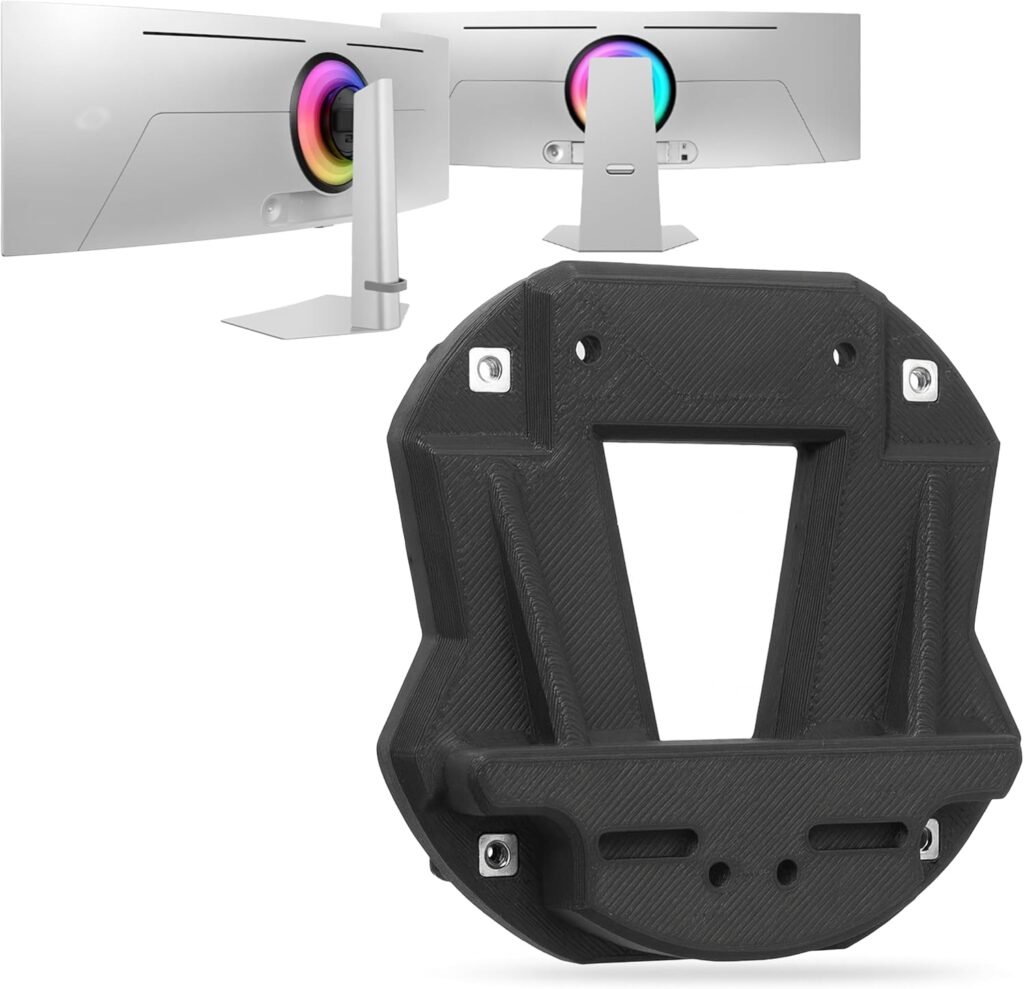
The 3IDEE adapter is listed for selected Samsung Odyssey OLED models and provides a 75×75 mm VESA pattern. That makes it a potential solution if your exact monitor is supported and your arm accepts that pattern. The key word is exact: Samsung has several Odyssey G9 and Neo G9 models, and this product page explicitly excludes some of them.
I haven’t physically tested this particular adapter, so I won’t present the seller’s stability claims as my own hands-on findings. Instead, I’ve checked the listing details and set out what to verify before buying, how to approach installation and where the product information leaves questions unanswered.
What the 3IDEE adapter does
A VESA adapter is a connector: it bridges a monitor’s particular mounting interface to the standard hole pattern used by a compatible arm or wall mount. It is not the arm or wall bracket itself. You still need a suitable mount, and the complete setup must be rated to carry your monitor.
The listing describes this product as a fixed, low-profile adapter made from reinforced plastic, identified elsewhere as PLA. It weighs 90 g, supports a 75×75 mm VESA pattern and is supplied with screws and instructions. The seller says installation takes only a few minutes and requires no special tools; treat that as a product claim rather than a guarantee for every setup.
In practical terms, it may be useful if you own one of the supported OLED displays and want to free up desk space with an arm. The adapter’s job is to provide the connection, not to improve picture quality or make an unsuitable arm safe. Check your mount’s instructions and weight limit as carefully as the adapter’s fit.
Compatibility: check the exact Samsung model
The listing names Samsung Odyssey OLED models G93SC and G95SC, along with regional model codes such as LS49KG950SCXZW, LS49KG950SNXZA, LS49KG950SUXEN, LS49CY934SUXEN, S49CG954SU and S49C950S. The full model code is usually printed on the monitor’s rear label or shown in its settings menu. Match that code against the seller’s current compatibility details before ordering.
The product page specifically warns that the adapter is not compatible with Samsung Neo G9 or G9 models with a white back cover. That matters because familiar family names can conceal important differences in rear housing and mounting geometry. “It’s a Samsung Odyssey G9” is not enough evidence of a fit.
There is also an inconsistency worth clarifying: the product information lists a maximum supported screen size of 32 inches, while the named Odyssey OLED displays are larger ultrawide models. Don’t guess what this means. Ask the seller to confirm compatibility for your precise model and intended installation, and request clarification on the stated screen-size limit before buying. The exact fit and the maker’s guidance should take priority over a broad product title.
What 75×75 mm VESA compatibility means
The product’s VESA specification refers to the spacing between the four mounting holes: 75 mm horizontally and 75 mm vertically, measured centre to centre. Your monitor arm or wall mount needs to accept a 75×75 mm plate. Many mounts support more than one pattern, but don’t assume yours does—check its manual or the label on its mounting head.
A VESA match is only one part of compatibility. The adapter must fit the monitor, its screws must be the right type and length, and the arm must be rated for the display’s weight and dimensions. A very wide curved monitor can create more leverage on an arm than a smaller, flatter screen, so screen size alone doesn’t tell you whether a mount is appropriate.
Before assembly, compare the adapter’s instructions with the monitor and arm manuals. If the fitting needs force, the holes don’t line up, or a screw seems too long, stop and check with the manufacturer. A nominally compatible VESA pattern does not make mismatched hardware safe.
Installation: take a measured, careful approach
The seller says the package includes suitable screws and instructions. Follow the supplied instructions for the exact monitor rather than relying on a generic mounting video. Work on a stable surface and protect the screen from pressure or scratches. If the display is large or awkward to handle, ask another person to help support it.
A sensible pre-installation check is to:
- Confirm the monitor’s full model code and the adapter’s compatibility.
- Check that the arm accepts a 75×75 mm pattern and supports the display’s weight.
- Lay out the supplied hardware and compare it with the instructions.
- Make sure cables won’t be trapped or pulled tight when the monitor moves.
- Check that the adapter sits flush and the mounting holes align naturally.
Tighten fasteners securely, but don’t overtighten them. This adapter is plastic, so excessive force may damage the part or the monitor’s mounting area. After fitting, keep a hand under the screen while checking that it is seated as instructed. If you notice movement, cracking, unusual flex or a poor fit, stop using the setup and contact the seller or mount manufacturer.
Build quality and stability: benefits, with a caveat
A lightweight adapter can be convenient, and the listing describes its construction as reinforced plastic, designed for a “low lever arm” and a secure, form-fitting connection. It also claims the monitor will stay firmly in place without tilting or wobbling. Those are useful aims, but they are seller claims; the page does not provide a stated load capacity for the adapter.
That missing figure is important. The monitor arm has its own weight limit, but that doesn’t automatically verify the adapter’s strength. For a large, curved screen, ask the seller whether the adapter is approved for your exact model and installation, and whether it has a specified load rating. Check that the monitor’s weight is within the arm’s limit too.
Because the listed material is PLA, ask the manufacturer for its care and operating guidance rather than assuming how it will perform in your room. Avoid modifying the adapter, substituting unapproved screws or using it where it can be knocked. Recheck the installation periodically, especially if you frequently move or reposition the display.
Pros and cons at a glance
| Pros | Cons |
|---|---|
| Provides a 75×75 mm VESA connection for listed monitor models | Not compatible with every Samsung Odyssey, Neo G9 or G9 |
| Lightweight at a listed 90 g | Product page gives no adapter load rating |
| Screws and instructions are listed as included | A 32-inch maximum-size specification appears inconsistent with named models |
| Model-specific shape may make installation simpler than improvising a fit | Fixed adapter; adjustability comes from the separate arm or mount |
The main advantage is convenience if your exact monitor is covered. A purpose-made connector can be preferable to trying to adapt a generic plate that doesn’t sit correctly. On the other hand, the ambiguous screen-size information and absence of a clearly stated adapter weight limit are reasons to verify details before purchase. I would treat exact model confirmation as essential, not optional.
Comparing mounting options
The right choice depends on what you need the adapter to connect and whether your existing equipment is suitable.
| Option | Best suited to | What to check |
|---|---|---|
| 3IDEE model-specific adapter | A listed Samsung OLED model and an arm that accepts 75×75 mm | Exact monitor code, size-limit discrepancy and load guidance |
| Universal VESA adapter or spacer | Monitors whose mounting geometry and required spacing match that product | Hole pattern, dimensions, clearance and screw length |
| Different model-specific adapter | A monitor excluded from this listing | Explicit compatibility for your precise model |
| Keep the original stand | A setup where desk space is less important or mount compatibility is uncertain | Stand footprint, stability and adjustment needs |
| Replace the monitor arm | An arm that cannot safely support the monitor or does not accept the required interface | Weight rating, VESA patterns and curved-screen suitability |
Don’t choose a different adapter just because its title includes “Odyssey” or “G9”. For example, the listing’s exclusion of some Neo G9 and white-back-cover models means another solution may be needed for those displays. Compare product manuals, not just marketing names.
Buying checklist: what I’d confirm first
Before placing an order, use this quick checklist:
- Monitor identity: Is the complete model code shown on the compatibility list?
- Exclusions: Does your monitor have a white back cover, or belong to a Neo G9/G9 range that the listing excludes?
- Size discrepancy: Has the seller explained the 32-inch maximum-screen-size entry?
- Mount interface: Does your arm or wall bracket accept 75×75 mm VESA?
- Weight and leverage: Is the monitor within the arm’s rating, and has the adapter’s suitability been confirmed?
- Hardware: Are the supplied screws specified for your monitor, and do the instructions explain their positions?
- Support: What does the stated two-year manufacturer warranty cover, and how can you contact the seller?
The listing showed a price of $22.99 and a 4.0 out of 5 rating from 26 global reviews at the time represented by the supplied product information. Prices and review counts can change, and a small review sample cannot establish that the adapter will suit every model or setup. The listing also mentions a free 30-day return option; check the terms shown at checkout and retain the packaging until fit is confirmed.
FAQs
Will this adapter fit every Samsung Odyssey G9?
No. The listing names selected Odyssey OLED models, including G93SC and G95SC, and explicitly excludes some Neo G9 and G9 monitors with a white back cover. Check the full model code with the seller before buying.
Does the adapter include a monitor arm?
No. It is an adapter only. You need a separate monitor arm or wall mount that accepts a 75×75 mm VESA connection and is suitable for your display.
What VESA pattern does it provide?
The listing specifies 75×75 mm. Check that your monitor mount supports this hole spacing; a mount that only accepts another pattern may not fit.
Why does the listing say a maximum screen size of 32 inches?
That specification appears inconsistent with the larger OLED models named as compatible. The product page does not explain the discrepancy, so ask the seller to confirm your exact model and intended use before ordering.
Is the adapter metal?
No. The listing identifies the material as reinforced plastic and gives PLA as the enclosure material. Follow the seller’s fitting instructions and avoid modifying or overtightening the part.
Can I use it with a wall mount instead of an arm?
The listing says it can be used with monitor arms and wall mounts, provided they accept the adapter’s 75×75 mm pattern. Confirm the wall mount’s load rating and installation requirements separately.
Conclusion
The 3IDEE adapter could be a useful way to connect a specifically supported Samsung Odyssey OLED to a 75×75 mm arm or wall mount. Its lightweight design and included hardware are practical features, but this is not a universal G9 solution—and the listing’s screen-size discrepancy and missing adapter load rating deserve a clear answer before purchase.
My recommendation is straightforward: verify the monitor’s complete model code, confirm the mount’s VESA pattern and weight rating, and ask the seller to resolve the listed size limit. If those checks all line up, the 3idee vesa adapter for samsung odyssey curved gaming monitor may suit your setup. If they don’t, choose a solution explicitly approved for your display rather than forcing a near match.