
Introduction
Want to move a monitor off its factory stand and onto a desk arm or wall bracket? First, check whether the screen has standard VESA mounting holes. Some Samsung models do not, which is where a Samsung monitor mount adapter may help. It can provide a connection to a compatible VESA mount, but it is not a universal bracket: the exact monitor model matters.
The VIVO MOUNT-SGT55 product page describes an all-steel adapter made specifically for Samsung T55 Series monitors. It supports VESA patterns of 75 × 75 mm and 100 × 100 mm. I’d treat those specifications as a starting point, then verify my monitor’s model number and the mount’s requirements before ordering.
Below, I’ll explain what the adapter does, how to assess compatibility, and what to consider before fitting it. I’ll also flag limitations, because a tidy setup is only a win if the screen is secure.
What a monitor mount adapter does
A VESA mount typically attaches to four threaded holes on the back of a screen. The holes follow standard spacing patterns, such as 75 × 75 mm or 100 × 100 mm. If a monitor has no standard holes, it may not attach directly to a typical monitor arm or wall mount.
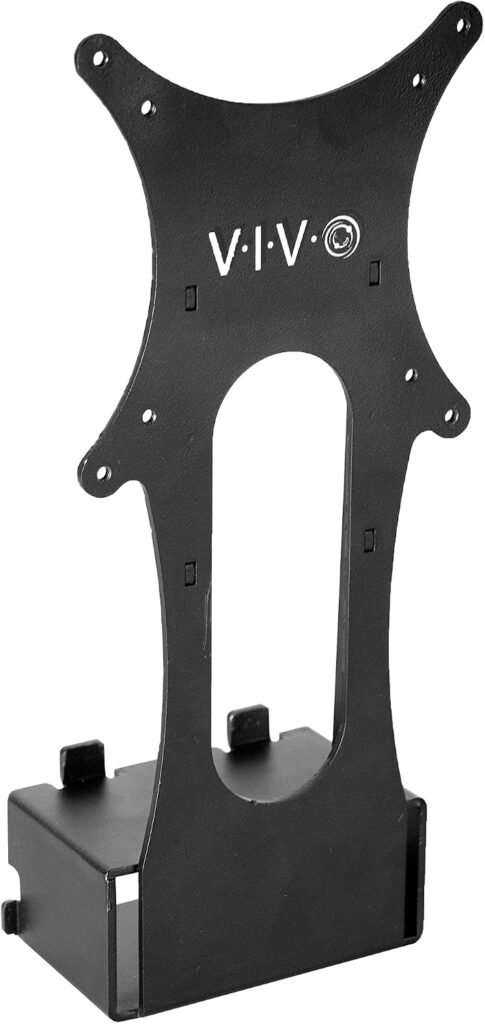
An adapter bridges that gap. In this case, the VIVO bracket is designed to fit specific Samsung monitors at one end and provide VESA-compatible mounting points at the other. That means you can connect a suitable desk arm, stand or wall mount—provided its mounting pattern and load limits are also appropriate.
It’s useful to separate two jobs:
- The adapter connects the particular monitor to a VESA mounting plate.
- The arm or wall bracket supports and positions the screen.
Compatibility with one part does not guarantee compatibility with the other. For example, the adapter may offer a 100 × 100 mm pattern, while your arm supports only a different pattern or has a weight limit below your monitor’s weight. I’d check both products rather than assuming “VESA compatible” means every combination will work.
The product listing also describes a cable-management opening. That can help route leads towards the arm, but it won’t hide every cable or replace careful cable routing.
Samsung monitor mount adapter: VIVO MOUNT-SGT55
The VIVO MOUNT-SGT55 is advertised for Samsung T55 Series monitors only. The listing describes a low-profile, black, all-steel bracket, with hardware included for attaching it to a compatible VESA mount. Its product images show VESA hole patterns of 75 × 75 mm and 100 × 100 mm.
According to the product instructions, the usual process is to remove the existing base and fit the adapter in its place. The adapter then gives the monitor mounting options it did not have on its own. That can free up desk space and make it easier to position the screen at a more suitable height.
A few practical details are worth keeping in mind:
- It is a model-specific solution, not a general Samsung bracket.
- The listing says it is designed only for the T55 Series.
- The page does not state a clear adapter weight rating in the material provided here. Check with VIVO or the seller if you need confirmation.
- Your desk arm or wall bracket still needs to support the monitor’s size and weight.
- The cable opening may help keep leads organised, but check that cables can still reach without being pulled tight.
I haven’t physically tested this bracket. So, rather than presenting installation as guaranteed to be effortless, I’d use the manufacturer’s manual and inspect the fit carefully as you go.
Check your Samsung model before buying
Model names can be confusing. A screen may look like a T55 or share a similar design, but a similar appearance is not proof that the adapter fits. Check the full model number on the rear label, in the monitor’s settings or in its original documentation. Then compare it with the seller’s compatibility list.
This matters because the product page gives a clear restriction: the MOUNT-SGT55 is designed for the Samsung T55 Series and says it does not fit other models. Some customer reviews report successful use with other Samsung screens, including an S39C. Those reports are useful anecdotes, but they do not replace the manufacturer’s stated compatibility. A successful fit for one buyer’s unit may not be a reliable fit for every version or production run.
Before placing an order, I’d make a small checklist:
- Write down the monitor’s full model number.
- Confirm that it is specifically included in the adapter’s compatibility details.
- Check whether the monitor has a different variant or regional model code.
- Ask the seller or manufacturer if the model is not explicitly listed.
- Check the return policy before opening or fitting the product.
If your model is not confirmed, don’t rely on a product photo or a review saying, “It worked for mine.” Finding the right bracket may take another search, but that is better than forcing an incompatible part onto an expensive screen.
Understand VESA sizing and mount requirements
The VIVO adapter is described as compatible with 75 × 75 mm and 100 × 100 mm VESA patterns. These numbers refer to the horizontal and vertical distance between the centres of the four mounting holes, measured in millimetres. They do not describe the monitor’s screen size.
Check your arm’s specifications for its supported VESA patterns. Also confirm its maximum screen size and weight capacity. If the arm uses a quick-release plate, make sure the supplied adapter hardware works with that plate and follow both manufacturers’ instructions.
| Check | What to verify | Why it matters |
|---|---|---|
| Monitor model | Exact model code is supported | Similar-looking models may use different fittings |
| VESA pattern | 75 × 75 mm or 100 × 100 mm is accepted | The adapter must meet the arm’s mounting layout |
| Weight limit | Arm supports the monitor’s weight | A compatible pattern alone does not mean a safe load |
| Mount style | Desk arm, stand or wall mount suits the setup | Different mounts have different hardware and clearance |
| Clearance | Space remains for plugs, cables and the wall | The bracket may make the back of the screen sit further out |
I’d be particularly cautious with a wall-mounted screen or an arm that will be moved often. Check the mount’s instructions and ensure the adapter and mount are secured as directed. If the combination’s weight rating is unclear, ask the manufacturers instead of guessing.
How to fit the adapter safely
Set aside enough time to install the bracket without rushing. Read the adapter manual and the mounting-arm instructions first, and work on a stable, clear surface. A second person can help support a larger or curved monitor while you remove the stand.
A sensible fitting sequence is:
- Confirm the screen’s model and the adapter’s compatibility before starting.
- Disconnect the monitor from power and unplug its cables.
- Lay it screen-down only if the manufacturer permits this, using a clean, soft surface.
- Remove the original base according to the monitor manual.
- Position the adapter as instructed and use the supplied hardware where specified.
- Attach the adapter to the VESA plate, checking that the pattern aligns properly.
- Tighten fasteners as directed; don’t overtighten them.
- With help if needed, place the monitor onto the arm and confirm it is secure before letting go.
- Reconnect cables with enough slack for the arm’s full range of movement.
The product listing describes installation as straightforward and says the required hardware is included. However, customer feedback is mixed on how snugly the bracket fits: many report an easy fit, while some describe alignment or stability problems. If the adapter does not sit properly, or requires unusual force, stop and check the model and orientation. Don’t modify the monitor or force the bracket into position. Once installed, test the screen gently and check that cables are not under tension.
Pros and cons to weigh up
A dedicated adapter can solve a frustrating problem: a monitor that works well but cannot attach directly to the mounting equipment you already own. The VIVO bracket is steel, offers two common VESA patterns, and has an opening for cable routing. Customer reviews on the listing are generally positive overall, although reported experiences vary.
Potential advantages
- More desk space: Moving the factory base off the desk can free room for a keyboard, notebook or speakers.
- More positioning options: A compatible arm may let you adjust height, tilt or reach.
- Sturdy material: The product is described as all-steel construction.
- Cable routing: The opening can help guide cables towards the arm.
- Hardware included: The listing says mounting hardware is supplied.
Potential drawbacks
- Narrow compatibility: The manufacturer states that the bracket fits only the T55 Series.
- Fit may vary: Some buyers report a snug or imperfect fit.
- No universal load guarantee: You must check the weight limits of the arm and the monitor combination.
- Screen clearance: An adapter can add depth behind the monitor, which may matter near a wall.
- Rotation may be an issue: One review reports instability when turning the monitor into portrait orientation. Treat this as a reason to test the exact setup carefully, not as proof that every installation will behave the same way.
In short, the adapter may be a practical fix, but it is not a shortcut around compatibility checks or safe installation.
Other ways to mount your monitor
If this bracket is not right for your screen, you still have options. The best alternative depends on whether you want adjustability, the lowest cost or a simple replacement for the factory base.
| Option | Best for | Trade-off |
|---|---|---|
| Original monitor stand | A quick, known-compatible setup | Uses desk space and may offer limited adjustment |
| Model-specific adapter | A monitor without standard VESA holes | Fit is restricted to the listed models |
| Universal VESA adapter | Certain monitors with unusual mounting arrangements | “Universal” does not mean it will suit every screen |
| Replacement stand | Users who prefer a freestanding setup | May not provide the reach or movement of an arm |
| Professional installation | Wall mounting or uncertain hardware | Adds cost, but can help with complex installations |
Before buying an alternative, look for a compatibility list that names your full model code. Check the hardware supplied, VESA sizes, weight rating and return terms. For a wall installation, also consider the wall type and use fixings appropriate to it. A product that attaches to the monitor correctly still needs a suitable, securely installed wall mount.
If you only want to raise the screen slightly, a freestanding riser may be simpler than fitting a new bracket. But if desk space and flexible positioning are the priority, a compatible arm and model-specific adapter can be a more useful combination.
UK buying advice
The product page provided for this guide displays a price in US dollars and a shipping charge to the United Kingdom; it also notes that sales taxes may apply at checkout. Prices, delivery estimates and fees can change, so check the final basket total in your own account before ordering. Don’t rely on a displayed US price as the amount you will ultimately pay in pounds.
I’d check these points before pressing “buy”:
- Seller and dispatch: Confirm who sells and ships the item.
- Total cost: Review shipping, taxes and any import-related charges shown at checkout.
- Delivery estimate: Treat the date as an estimate, especially if the item is coming from overseas.
- Returns: Read the current return conditions and keep the packaging until you’ve confirmed the fit.
- Product identity: Check that the listing is for MOUNT-SGT55, not a similar bracket for another Samsung series.
The supplied product page states free international returns, but return conditions can depend on the order and current seller terms. I’d verify what applies to your specific purchase. Keep the order confirmation and take care when unpacking so the product can be returned in acceptable condition if it proves incompatible.
Frequently asked questions
Will the VIVO MOUNT-SGT55 fit every Samsung monitor?
No. The product listing says it is designed only for Samsung T55 Series monitors. Check the full model number before buying, and ask the manufacturer if your exact variant is not listed.
Which VESA sizes does this adapter support?
The listing specifies 75 × 75 mm and 100 × 100 mm patterns. Check that your desk arm or wall mount accepts one of these patterns, as well as supporting the monitor’s weight.
Does the adapter come with mounting hardware?
The listing says the necessary hardware is included for securing the bracket to a VESA-compatible mount. Check the product manual and package contents when it arrives, as hardware needs can vary by setup.
Can I use it with a wall mount?
The product description says it can be used with compatible VESA wall mounts. Confirm the wall bracket’s VESA pattern, load rating, fixing method and clearance before installing the screen.
Can I rotate the monitor into portrait orientation?
The product page does not guarantee portrait-mode stability. One customer review reports movement when rotating their screen. Check the arm and adapter instructions, and test the monitor carefully rather than assuming rotation will be secure.
What should I do if the adapter feels too tight?
Stop and check the model, orientation and installation instructions. Customer feedback includes reports of snug fits, but you should not force the bracket or alter the monitor. Contact the seller or manufacturer if the fit remains uncertain.
Conclusion
A model-specific bracket can make a monitor-arm setup possible when a screen lacks standard VESA mounting holes. The VIVO MOUNT-SGT55 is listed for Samsung T55 Series monitors and supports 75 × 75 mm and 100 × 100 mm patterns, but the exact model and the arm’s load rating are essential checks.
I’d verify compatibility, read both manuals, compare the full UK checkout cost and stop if anything fails to align during fitting. Get those details right, and you can make a more informed choice—and potentially reclaim valuable desk space without taking unnecessary risks.