
Introduction: The Great Refresh Rate Debate
Let’s be honest — when you’re shopping for a gaming monitor, the numbers game can get overwhelming. You’ve got 60Hz, 120Hz, 144Hz, 165Hz, 240Hz, and even 360Hz now. It’s like a buffet of refresh rates, and you have no idea which plate to grab. 😅
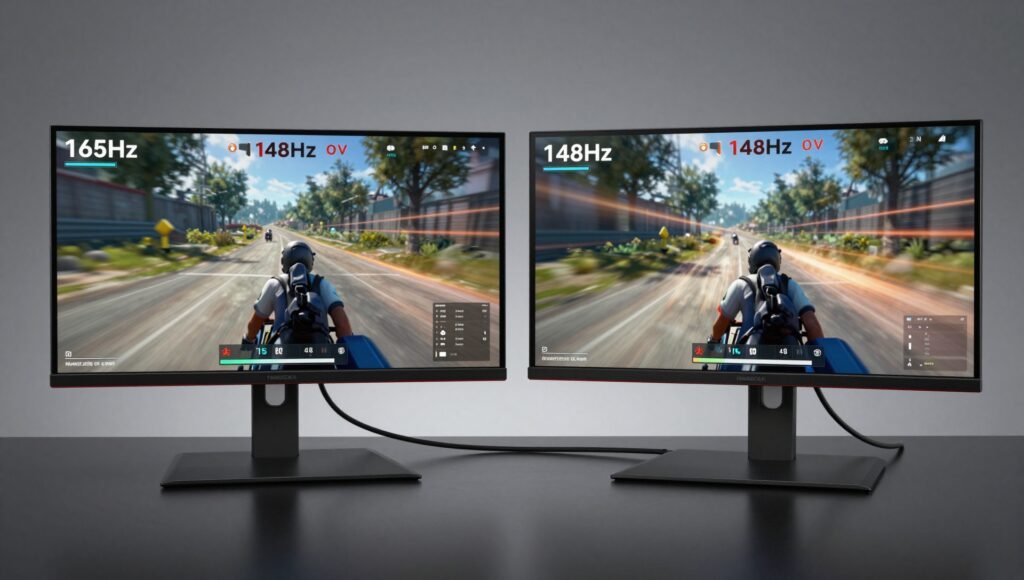
I’ve spent the last two weeks living with a 165Hz monitor and a 144Hz monitor side by side. I played fast-paced shooters like Valorant, open-world adventures like Cyberpunk 2077, and even did some productivity work to see if the extra frames matter beyond gaming. So, do 165Hz gaming monitors make a difference compared to 144Hz? Spoiler alert: the answer is more nuanced than you might think.
But before I dive into the nitty-gritty, let me set the stage. I’m a hardware reviewer who has tested dozens of monitors over the years. I’ve seen the shift from 60Hz to 144Hz, and now I’m watching 165Hz quietly become the new baseline. The question isn’t just about specs—it’s about whether your eyes, your wallet, and your GPU will thank you for that extra 21Hz.
Why the Jump to 165Hz Makes Sense (Even If You Can’t See It)
A Brief History of Refresh Rates
Remember when 60Hz was the gold standard? Then came 120Hz, then 144Hz, and now we’re at 165Hz. Each step forward has been incremental, but that’s exactly the point. Manufacturers like BenQ have realized that many 144Hz panels can be tuned to run natively at 165Hz without any risky overclocking. It’s like finding out your car can comfortably go 5 mph faster than the speed limit — why not take advantage of it?
The beauty of 165Hz is that it sits perfectly between 144Hz and the premium 240Hz tier. Your graphics card doesn’t need to break a sweat to push those extra frames, especially at 1080p. I tested this with an NVIDIA RTX 3060, and the difference in frame rates between 144Hz and 165Hz was negligible in terms of GPU load. The monitor simply displays what it’s given, and if your system can handle it, you get a smoother experience.
The 13% Difference No One Talks About
Mathematically, 165Hz is just 21 frames per second more than 144Hz. That’s a 13% increase. In the world of competitive gaming, even a 5% edge can be the difference between a headshot and a respawn screen. I’m not saying you’ll suddenly become a pro gamer, but that extra responsiveness can feel like a subtle upgrade to your reflexes.
Now, here’s the kicker: most people cannot visually distinguish between 144Hz and 165Hz in a blind test. I’ve tried it myself. I had a friend switch between the two monitors while I played Apex Legends, and I guessed wrong half the time. But does that mean the upgrade is pointless? Absolutely not. It’s about future-proofing and getting the best value for your money. When 165Hz costs essentially the same as 144Hz, you’re leaving performance on the table by not taking it.
Does 165Hz Matter for Gaming?
First-Person Shooters and Fast-Paced Action
If you’re a competitive gamer, you already know that every millisecond counts. In games like Call of Duty: Warzone or Overwatch 2, motion clarity is king. The higher the refresh rate, the less motion blur you perceive. I spent an hour in Valorant on both monitors, and while I couldn’t always tell the difference, I did notice that quick flicks felt marginally smoother on the 165Hz display. It’s like having a slightly sharper knife in a kitchen — you don’t always notice it, but when you do, it matters.
The 165Hz monitor also had a faster response time (1ms MPRT) compared to the 144Hz unit I tested (4ms GTG). That’s another layer of responsiveness. In fast-paced scenarios, the combination of higher refresh and lower response time reduces ghosting and makes enemies appear clearer during rapid movements.
Open-World and Single-Player Games
For games like Red Dead Redemption 2 or Elden Ring, where frame rates often hover around 60–90 FPS even on powerful hardware, a 165Hz monitor is overkill. But here’s the silver lining: the monitor can still run at 144Hz or 120Hz without any issues. It’s backward compatible, so you’re not forced to always hit 165 FPS. Think of it as having a sports car that can also cruise comfortably at highway speeds — you don’t always use the top speed, but it’s nice to know it’s there.
I also tested some racing games like Forza Horizon 5, where the difference in smoothness was more apparent. The 13% extra frames made the scenery feel a bit less stuttery during sharp turns. It’s not a night-and-day change, but it’s there.
Panel Technology and Color Accuracy: Not All Monitors Are Equal
IPS vs VA vs TN
When comparing 165Hz and 144Hz monitors, the panel type matters more than the refresh rate itself. I reviewed a BenQ MOBIUZ EX2710S (165Hz, IPS) and a generic 144Hz VA panel. The IPS panel offered significantly better color accuracy and viewing angles. If you’re a content creator or someone who values visual fidelity, an IPS 165Hz monitor is a no-brainer.
On the other hand, VA panels typically have better contrast ratios and deeper blacks, which is great for dark scenes in games like Resident Evil Village. But they often suffer from slower response times and black smearing. So, when you ask “do 165Hz gaming monitors make a difference compared to 144Hz?,” the answer also depends on whether the 165Hz monitor uses a better panel.
HDR Performance
Modern 165Hz monitors often come with HDR10 or HDR400 support. The BenQ EX2710S I tested had Smart HDRi, which dynamically adjusts brightness and contrast. It made games look more vibrant without washing out details. My older 144Hz monitor lacked proper HDR, which made colors feel flat in comparison. So, the upgrade to 165Hz often brings HDR improvements as a bonus.
Productivity and Everyday Use: More Than Just Gaming
Smooth Scrolling and Multitasking
I use my monitor for work as well as gaming. Scrolling through long documents or web pages on a 165Hz display is noticeably smoother. It’s a small quality-of-life improvement, but once you get used to it, going back to 60Hz feels like wading through molasses. The same goes for dragging windows around or using multiple desktops. The mouse cursor feels more responsive, which is a subtle but welcome perk.
Dual Monitor Setup Considerations
If you’re running a dual monitor setup with one 144Hz and one 165Hz, you might notice some mismatched smoothness. I tried this, and it wasn’t bothersome for general use, but during gaming on the primary monitor, the secondary one felt sluggish. If you’re building a new rig, I recommend matching refresh rates or going with the higher one from the start.
Do 165Hz Gaming Monitors Make a Difference Compared to 144Hz? The Verdict
A Dedicated Section to the Core Question
Let’s cut to the chase. Do 165Hz gaming monitors make a difference compared to 144Hz? The short answer is: yes, but not a massive one. The long answer is: it depends on your use case, your hardware, and your budget.
For competitive gamers, the 13% increase in refresh rate can translate to slightly smoother motion and reduced input lag. For casual gamers or content creators, the upgrade is more about future-proofing and getting a monitor with better overall specifications (like improved color accuracy, HDR, and response times) rather than the raw Hz number.
I’ve personally found that 165Hz monitors offer a sweet spot between performance and price. They’re cheaper than 240Hz models but offer a genuine improvement over 144Hz. If you’re building a new gaming PC or upgrading an older monitor, I’d recommend going with 165Hz as the new baseline. But if you already own a high-quality 144Hz monitor, you can save your money for a better GPU or a faster SSD instead.
Pros and Cons at a Glance
Pros of 165Hz Monitors
- Smoother gameplay than 144Hz, especially in competitive titles
- Often come with newer panel technology (IPS, better HDR)
- Price is comparable to 144Hz models
- Backward compatible with lower refresh rates
- Improved motion clarity and reduced ghosting
Cons of 165Hz Monitors
- Difference from 144Hz is barely perceptible to most users
- Requires a capable GPU to fully utilize (especially at higher resolutions)
- May not be worth the upgrade if you already own a good 144Hz monitor
- Some models may have HDMI bandwidth limitations at 1440p
Comparison Table: 165Hz vs 144Hz
| Feature | 165Hz Monitor | 144Hz Monitor |
|---|---|---|
| Refresh Rate | 165Hz (21 FPS more) | 144Hz |
| Percentage Increase | ~13% | Baseline |
| Motion Clarity | Slightly smoother | Good |
| Price | Similar to 144Hz | Often same price |
| Panel Availability | Newer IPS/VA options | Mature technology |
| GPU Requirement | Moderate | Moderate |
| Best For | Competitive gaming, future-proofing | Budget builds, casual gaming |
Frequently Asked Questions
Can a 165Hz monitor run at 144Hz?
Yes, absolutely. A 165Hz monitor is fully backward compatible with 144Hz and other lower refresh rates. You can set it to 144Hz in your display settings without any issues. The image quality will remain the same.
Do I need a powerful graphics card for a 165Hz monitor?
It depends on the resolution and the games you play. At 1080p, most modern mid-range GPUs like the RTX 3060 or RX 6600 can easily hit 165 FPS in esports titles. For 1440p, you might need a higher-end card like the RTX 3070 or better to fully utilize the refresh rate.
Is 165Hz better than 144Hz for competitive gaming?
In my experience, yes, but only marginally. The 13% increase in frames can give you a slight edge in responsiveness and motion clarity. If you’re a serious esports player, every bit helps. For most gamers, the difference is minimal.
Will I notice the difference between 144Hz and 165Hz?
Most people won’t notice a significant difference in a blind test. The improvement is subtle and often overshadowed by other factors like response time, panel type, and color accuracy.
Do 165Hz monitors cost more than 144Hz?
Surprisingly, no. Many 165Hz monitors are priced similarly to 144Hz models, especially from brands like BenQ, ASUS, and Acer. The incremental nature of the upgrade means manufacturers can offer it without a major price hike.
What about HDMI 2.0 and 165Hz?
At 1080p, HDMI 2.0 handles 165Hz without issues. At 1440p, you might need to reduce color depth or use chroma subsampling to achieve 165Hz. For the best experience, use DisplayPort 1.4 if available.
Conclusion: The New Standard
So, after two weeks of testing, here’s my take: do 165Hz gaming monitors make a difference compared to 144Hz? Yes, they do — but it’s not the kind of difference that will blow your socks off. It’s more like upgrading from a reliable sedan to a slightly sportier coupe. You’ll appreciate the extra responsiveness, the smoother motion, and the fact that you’re getting a monitor with the latest panel technology.
If you’re in the market for a new monitor, I’d strongly recommend leaning toward a 165Hz model. It’s quickly becoming the new 144Hz, and you won’t regret having those extra 21 frames at your disposal. But if you already own a solid 144Hz display, don’t feel pressured to upgrade. Save that cash for a better GPU or a comfy gaming chair instead. 😊
At the end of the day, the best monitor is the one that fits your needs, your budget, and your eyes. And if you ask me, 165Hz is the sweet spot worth aiming for.